Inauguration – January 20, 2009

swearing-in2Last week I got a chance to be in Washington DC for the Inauguration of Barrack Obama as President of the United States.

It was a day of ups and downs, but the primary feeling was one of incredible hope and anticipation for good things ahead. We did get caught in one of the crowd scenes and nearly missed getting in place for the actual event, but it all worked out. It was amazing how the mood of the crowd was so bright and optimistic, with people helping each other, making sure kids weren’t squished, and passing along what little information was available.

paradeWe were very fortunate to have an indoor place to watch the Inauguration and parade, so the few hours we spent getting there was well worth it. We could also go up on the roof deck and see even more, with a view that went from Capitol Hill to much of Pennsylvania avenue. There were a couple of broadcast crews stationed on the roof too, and if you study the photos, you will see Al Sharpton in one of them.

I’ve uploaded a set of photos from the day, which ended up at the Bytes and Books Inaugural Ball. No, I didn’t dance with Barrack, but it was still a day I’ll never forget.

Sylvia

Free NASA opportunity for California math/science teachers

NASA Ames Education and the Lewis Center for Educational Research, is conducting a special workshop for up to 25 science and math teachers from local schools February 26 – 28, 2009 at NASA Ames Research Center, Moffett Field, CA.

This 3-day training program provides teachers with all the necessary tools to remotely access and control the Lewis Center’s, 34 meter, Goldstone Apple Valley Radio Telescope (GAVRT) from their classrooms. The GAVRT program involves American students throughout the world in real science using a hands-on, standard-based curriculum that helps middle and high
schoolers reach for the stars. Students participating in the GAVRT program will assist NASA by monitoring the progress of the LCROSS (Lunar Crater Observation and Sensing Satellite) during its mission to the moon in 2009.

The GAVRT training is normally $600 per teacher. However, due to a unique LCROSS scholarship opportunity, this workshop is currently FREE to 25 teachers! And, these 32 hours of professional development are recognized for state, district, and NCLB requirements. If you are teaching science or math in your classroom, you are qualified to apply for this unique program.

The training will include a special NASA Ames tour at that is not normally open to the public. Andrew Chakin, world-renown author of Man on the Moon – the basis of Tom Hanks’ miniseries From the Earth to the Moon will meet with the teachers to share his experience inspiring students.

For more information about the LCROSS Mission and the Lewis Center and GAVRT program visit : http://www.lewiscenter.org/gavrt and http://lcross.arc.nasa.gov/

Applications are now being accepted for this exciting program. To enroll, immediately contact: Barbara Patterson at NASA Ames Research Center: barbara.e.patterson [at] nasa.gov 650-604-0494

Inauguration Day

Well, the plans are finalized – next Tuesday, January 20, 2009 I will be in Washington DC for Inauguration Day. It’s still unknown if I’ll be able to GET to the actual Inauguration; there are various websites predicting a major traffic and transportation meltdown. But I’ve got a warm jacket and walking shoes so if need be, I can hike it!

All over the country and around the world, people will be watching on television, and I hope a lot of students get to watch too. Kevin Jarrett has pulled together some Inauguration Day Resources for teachers and students to explore for background information and lesson ideas.

Think of me while you are warm and dry!

Sylvia

PS I’ll try to Twitter and send pix, but it’s expected that the text and Internet will be heavily taxed in the area. Follow me on Twitter if you’d like to see me try!

Technology Literacy and Sustained Tinkering Time

Yesterday I was reading a handout by Dr. Stephen Krashen called 88 Generalizations about Free Voluntary Reading. It summarizes the research and benefits to literacy of Sustained Silent Reading (SSR), also called Free Voluntary Reading (FVR). You give kids books, and time to read them, and they read.

Dr. Krashen is an activist for giving students more access to books, more time to read, and less coercion to do so. His credentials are impressive: professor emeritus at USC, a linguist and expert on literacy, language acquisition and reading. He’s in the International Reading Association’s Reading Hall of Fame.

I have no trouble admitting that his articulate positions and research resonate with me.

It struck me as I looked at this list that it’s a lot like what I believe about children and computers: that student choice, plus time for unstructured access to lots of different computing experiences is crucial to developing literacy and fluency with computers. My vision includes a teacher or mentor modeling passion, collaboration, interest in the subject, and offering experiences that challenge students without coercion, tricks, or rankings. If I had to come up with a catchy acronym, I’d call it Sustained Tinkering Time (STT).

Picking through his generalizations about reading, it occurred to me that some of them are very applicable to students using computers, and some seemed not to translate too well at all.

Hallmarks of Free Voluntary Reading (FVR) (adapted by me from Krashen’s list)

  • Free access to lots of different kinds of books
  • Comic books and magazines are OK, hard and easy books fine, minimum censorship
  • The teacher reads too
  • No tests, book reports, logs, comprehension quizzes
  • Comfortable space to read
  • More often and short is better than long, but rare
  • For all kids, not a reward or remediation
  • Supplement with interesting experiences about reading – trips to library, discuss literature, conferences, etc. (not skill building)
  • Good readers tend to be narrow readers (they stick to one genre)
  • Look for “home run” books

So, looking at this list, there are some things that seem really relevant to the kind of computer fluency I would like all students to have. Wouldn’t it be great if students had:

  • Free access to lots of different kinds of books software and hardware
  • The teacher reads works on computer projects too
  • No tests, book reports, logs, comprehension quizzes
  • Comfortable space to read work on computer projects
  • and that this was for all kids, not a reward or remediation?

I’ve skipped over some hard questions…
But not everything seems to perfectly translate. In FVR, the students are allowed to read pretty much anything (within reason). But for technology, I certainly would hope that aimless surfing or watching random YouTube videos isn’t what happens.

Is this being hypocritical? Is this just a way for me to pass judgement on applications that I like and think are “important” vs. ones I deem trivial and a waste of time? If I say, “no games” – am I just doing the same thing as a teacher demanding that kids only read “good” books for SSR, and thereby undermining the process?

I know in my head what I’d like to see – mindful interaction with the computer, making good things, focused collaboration, working on projects. Something that rises above drill and practice, clicking on stuff, or just watching. But what about chatting? Looking at email? What about playing “good” games? If you want technology literacy, does it matter if one student becomes fluent in making Wordles and another learns to program?

What’s the verb?
What is it that the student is doing that’s equivalent to reading? If you show language literacy by reading and writing, you show technology literacy by … what? Computing? Touching a mouse? Technologizing?

There’s something I’m trying to capture here that goes beyond the mere physical presence of a child sitting in front of a digital device. I really think this elusive concept is at the heart of what many have been struggling with as we all try to define “technology literacy.” Especially if we try to make the definition more than a checklist of skills.

You can smell collaboration in the air (especially in middle school)
There are other pieces of Sustained Silent Reading that really don’t work for technology, like the “silent” part. Sustained Silent Computing sounds terrifying. When I think about the kind of collaborative technology experience I’d hope to see, the kind I’ve seen in too few classrooms, it’s anything but silent. It’s purposeful, joyful noise, and you can tell the difference. But how do you articulate that?

It’s simply not good enough to say, “I know it when I see it.” But I’m not sure what to call it without tying myself up in semantic knots.

Pinning these experiences down with precise language deadens them like a pithed frog. (I was going to say a pinned butterfly, but when you can use pithed frog in a sentence, I believe it’s mandatory.)

What do you believe about learning?
And even if we got the words right, would it actually result in improved technology literacy? Would the lack of coercion raise the general level of technology literacy or lower it? In SSR, if one student is reading a comic book and another a chapter book, do they influence each other?

And is that part of the teacher’s job – to offer other activities that generate interest in more complex work? To model curiosity and trying new things? To facilitate collaboration and challenge students?

Without technology literacy skill tests, lessons on tools, and assigned projects, will students take more risks and try more complex things? Or will they do the least amount possible? I think this boils down to what you believe about learning – is it natural or does it have to be coerced.

Depth, not breadth
If you’ve stuck with me this long, do you see the technology corollaries to:

  • Good readers tend to be narrow readers (they stick to one genre) – is this about depth? Letting kids explore one application or theme deeply rather than the usual if-it’s-tuesday-it-must-be-spreadsheets overview of office products?
  • Look for “home run” books – is this about helping kids find the thing they really like to do? If a kid LOVES Comic Life, do you let them use it exclusively? Does the positive experience then open the door for that student to attempt other things? Or does it narrow the range of what that student will ever figure out how to do?

Yes, you…
So I’m throwing this out there to you, the dozens of folks who read this blog. Does looking at FVR help with defining technology literacy?

What would Sustained Tinkering Time look like to you?

So many questions…

Sylvia

Subscribe to the Generation YES Blog

Games that encourage student teamwork and collaboration

Freechild Article | “Why Play Games…” By Adam Fletcher.

Here’s another fabulous article and set of resources from Adam Fletcher of The Freechild Project. The article is about playing games with students and youth groups to encourage teamwork, model constructive, collaborative behavior, and develop a shared sense of mission.

Games can be a catalyst that brings both cohesion and energy to any group, and a welcome addition to a teacher’s “bag of tricks”. Two categories of games are especially helpful in setting a tone of collaboration and teamwork for students.

Cooperative games emphasize participation, challenge, and fun, rather than sorting out winners and losers. These kinds of games teach teamwork, empathy, and trust.

Initiative games have players attack a problem and solve it. They teach leadership, problem solving, and collaboration.

“Why Play Games…” is more than just a list of games. It includes practical information about how to choose them, how to introduce them, how to create reflective activities that further magnify the impact of the game itself, and tons of additional resources.

Teachers who lead student tech clubs know that the success of the group depends on much more than tech skills. Teamwork and a sense of mission result in the “we” being more than the “me” and can take a student tech team to the next level.

This isn’t just for student clubs either. If you want students to unlearn the competitive habits that have been drilled into them and work cooperatively, these games will work in classroom situations too. Collaboration and communication may be “21st century skills” but having students play them out in game situations is a timeless idea.

Give this short article a read and I guarantee you will learn one new thing today! “Why Play Games…” By Adam Fletcher

Selected additional resources (there’s a lot more if you click on the article link):

  • Brand-new (and free) guide, The Freechild Project Guide to Cooperative Games for Social Change by A. Fletcher with K. Kunst. “This insightful new guide will help community workers, teachers, activists, and all kinds of people find fun, engaging, and powerful activities that promote teamwork, communication, and social justice.Click here for a free download.

2008 in review

Found a cool little widget just in time for a “best of 2008” post. According to Postrank – these are the Generation YES blog posts that measured the highest in “audience engagement” for 2008. How do they know? Did they engage you?

Get your own Postrank widget here.

Happy New Year!

Sylvia

The Parent-Teacher Talk Gains a New Participant – NYTimes.com

The Parent-Teacher Talk Gains a New Participant – NYTimes.com.

Today’s New York Times features an article about student participation in teacher-parent conferences. Good news: good facts and stories woven into a compelling article that supports student empowerment by including them in their own education. Bad news: it’s not new, and leaves out the mountains of research and practice about student conferences.

But, Google to the rescue! Here’s a great collection of resources from Education World (and hurray, recently updated) about how to plan and implement successful parent-student-teacher conferences.

Sylvia

Words are just words

Speculation on Obama’s choice for Secretary of Education is flying fast and furious. Several governors, superintendents of big school districts, an education professor, and a couple of businessmen are rumored to be in the running.

The language being used in the press is interesting to watch. As Alfie Kohn points out, in a new article in The Nation, Beware of School “Reformers”, the word “reform” has been stolen. It seems to have been co-opted by people wanting to bust teacher unions and test kids more.

Several education blogs have expressed their feelings on this Orwellian turn of events. I urge you to read Deborah Meier, Scott McLeod, Tim Stahmer, Gary Stager, Doug Johnson, David Warlick, Mike Petrelli, and I’m sure more I’ve missed.

What occurs to me is that every time we allow simplistic slogans to do our talking for us, we run the risk of having them stolen, misinterpreted, and co-opted.

Now, this is hardly as momentous as whether reform is really mean-spirited test prep factories or happy places for children to learn — but I think that “21st century skills” and “___ 2.0” have essentially become meaningless.

People use empty words for a reason, because it’s easier to use an evocative phrase that has no true meaning. The listener does all the work, adding their own imagination of what the phrase means. Then, voila!, the speaker has just concocted a brilliant metaphor that everyone can agree with because there are no messy details involved.

Marketers call these words, “empty vessels“, because in advertising, you want the consumer to imagine your product is perfect. What better way than to sell them their own imagination.

When I talk about teaching with technology, I intend it to mean giving students access to tools and teaching them to find answers to tough problems that challenge them. I want kids to be able to think and act, construct, compute, solve, share, and more. There are nuances and details that paint the complete picture of what I think teaching and learning should look like in the 21st century. And sure, many of these are simply aspects of what a good education should have provided in any century.

But I often hear people talk about “21st century skills” and invariably someone will immediately say, “Oh yes, we’ve bought active whiteboards for all our classrooms.” When you’ve been in as many classrooms as I have, you know that the vast majority of these whiteboards are being used as a projection screen and most of the rest are pushed awkwardly into a corner with boxes stacked up in front of them. Something didn’t translate. Obviously no one “planned” this, but somewhere between “We’re moving into the future!” and “Where can I roll this stupid thing so it won’t block the bulletin board,” there was a big failure to communicate.

Any idea that involves how human beings learn is complex, and complex ideas don’t make pretty speeches and zippy headlines. I wish I knew how to fix that.

It’s hard to know what Obama really believes about learning and what he believes will work for public schools. His own choice for his children’s school stands in direct contrast to statements he’s made about “accountability”. But soon we’ll see if he believes what’s right for his kids is the same as what’s right for everyone else.

We’ll see.

Ten to ask – How to predict the Web 2.0 winners

In the last few years, it seemed like there was an endless stream of new Web 2.0 applications. If you didn’t like one, twenty new ones would appear. Now that party is over. A while back I wrote a post about this, Web 2.0, the meltdown, and education.

But it’s not at all clear cut who will make it through the tough times. There’s a lot of good stuff out there that is great for classroom use. But we know that lots of these tools are made by companies that are simply going to pack up and go home in the near future. So how can educators figure out which of their favorite tools will remain standing?

Here are ten questions and thoughts to ponder.

1. Do they make money?
Here’s the big question. A company with no visible means of support is not living on love. Someone is taking home a paycheck. Someone is paying the server bill. These companies are either someone’s home brew project in mom’s basement, or they have investors. Investor money runs out eventually, and there isn’t going to be a lot of new investment anytime soon. If there is no revenue, they have less of a chance to survive.

Ad revenue is almost as shaky as no revenue, since in a recession, ad rates tend to fall like a rock. Who clicks on banner ads anyway? People stop kidding themselves about these things when the money runs out.

Some small, individual projects can be very useful, but if they are cursed with popularity, they will need more people, servers, and other stuff that costs money. Maybe the key is to keep your favorites to yourself. Stop sharing! (OK, probably not the best answer.)

2. Spend some time with your favorite search engine.
All US public companies have to file documents with the government that give details on their finances. These are available online. Plus, if they are large, analysts and the press write about them. Stock price is an indicator too, if it’s gone down (worse than most!) that’s an indication something is wrong. In cases like Yahoo, all the bad news about failed mergers, the CEO leaving, and things like this are an indication of a company in crisis. It’s not smart to depend on them.

A non-public company is harder to find out about. But in my book, the more self-aggrandizing publicity a company has gone after, the more likely they are in it just for a quick flip. So for me, I’ll take the company with less news about awards, big PR blitzes, and showing up at every social media event.

For example, look at Zoho, which makes productivity and collaboration web applications. They just continue to crank out good, solid products and services. Plus, they have a business model – they sell their premium services. And they make money. Check out this interview with Zoho CEO Sridhar Vembu, about how he and his brother bootstrapped the company (meaning no outside investment) while his wife earned enough money to support the family. Smart, sensible, and pragmatic.

Are they a better long-term bet than Google Docs for web-based productivity tools? Who knows?

3. Do they have investors and how long will the money last?
Try searching on the company or tool name plus words like “invest”, “funding”, “owner”, “sell”, “layoff”, or “round”.

For example, if you are thinking about starting a local district professional development network using Ning as the basis, you might be very worried that they will just disappear. Google “Ning funding” and you find several sites that confirm that Ning received $44M in July 2007, and another $60M in April 2008. This article makes some guesses about how much money Ning makes – only $2M per year on subscriptions and ads, so they certainly need to figure out how to make money. However, $100M is a whole lotta money to skate on while you figure things out, so they may make it through to the other side.

A company that’s trying to go big but got a less than $5M investment more than a year ago might be having serious problems.

Another measure is how many employees they have. A completely rough estimate is that every employee costs $100,000 – $200,000 per year. The high side is companies that need vast server farms or other exceptional costs. As a rule of thumb, a company with 10-20 employees, a $2M investment, but no income can only last a year.

Linden Labs, the makers of Second Life, says they are doing great with 300 employees. They raised $11M in funding in 2006, and $8M a few years before that. Obviously they are making enough money from Second Life to sustain themselves or they would have gone out of business already. This blog from a venture capital firm estimates their revenue at $8M per month, or nearly $100M per year. This blog does the same calculation and guesses their expenses are about $30M for employees, plus another $10M for office space, servers, and other stuff. So, if these guys are right, Linden Labs is making at least $40M profit per year on Second Life.

The question is, if you are a school about to drop a lot of money and resources on a Second Life presence — will the economy, or some newer, sexier virtual world cause their subscriptions to drop and sales to slide? Most of their money is made on virtual land sales, not subscriptions, and if I had to guess, only new subscribers buy a lot of land. After a certain amount of time, people tend to “settle down.” But still, $40M a year is a nice cushion. It’s hard to be sure if all the speculation is true, since Second Life is not a public company. But my guess would be that Second Life will still be around for a few years. And better yet, will still have time to cultivate educators and cater to their special needs.

Yes, I know Second Life is not technically a Web 2.0 app, but neither is Google Earth or Twitterific or half a dozen others — everyone lumps these things together. Who am I to try to untangle the misunderstanding of what Web 2.0 is?

4. Layoffs?
Actually, this is a mixed bag. Layoffs can be the sign that a company is intelligently trimming its sails to ride through the storm. However, layoffs that cut to the bone are a sign that the company is about the crash and burn. How do you know which is which? That’s hard, especially with small, startup companies. There are sites like TechCrunch that watch the technology industry, but layoff news is often full of unsubstantiated rumors.

5. Gut check — does this make sense?
C’mon, who really thought a social network for people who love their sneakers was a good idea. Let’s get real, this was simply a couple of guys trying to cash in on the social media craze.

Not to keep picking on Yahoo, but there was a recent announcement that Yahoo for Teachers has been shut down. This was going to be a social networking site for teachers offering portfolios, networks, and other free goodies. Now the service has been cancelled by Yahoo, and the former URL (teachers.yahoo.com) redirects to the main Yahoo page. But a new site, called Edtuit, says it “… picks up where Yahoo! for Teachers left off.” But look around the site, there are no names, no explanation of who they are, or why a teacher should believe any of this. If Yahoo couldn’t make it work, how will they?

To me, this kind of announcement sends up a big red flag. Call me when they go live in “Fall 2008” — oops!

6. How big are they?
Strangely, the ends of the continuum will win. Big, big companies tend to have resources and deep pockets. Small companies can survive like cockroaches. People can work virtually, keep their day jobs, live in mom’s basement, or on a spouse’s paycheck. Some of these are student projects. Medium size companies have problems. Keeping 10-150 people employed is one of the toughest jobs ever.

Take Wordle, for example. Wordle is a web toy that makes pretty word clouds out of text. On the Wordle website, there is one person’s name listed with an email address. The blog says he’s an IBM engineer who wrote the code in his spare time. No investors, no PR and marketing budget, just a guy who likes words. My guess is that Wordle will survive.

Will little, one programmer projects like Wordle survive? Sure, until he or she loses interest (or graduates from high school.)

7. What’s your exit strategy?
If you are in love with ustream, Qik, Flickr (uh oh, owned by Yahoo!), or any free service for that matter, don’t assume that their business model will stay the same, and that your use won’t be affected. A few will just disappear without a word. But there is no doubt that all these companies will have to make money off these services to survive. Don’t expect them to send out a memo, these people are fighting for their lives. When you find Viagra ads embedded in your “free” videos in the middle of a class project, that’s when you’ll find out how they decided to monetize their service. You know you are supposed to back up your hard drive, now you have to back up your “cloud” too!

8. Is it great? Would you pay for it?
If this is something you already use, you know quite a bit. Does it just plain work or are there a few too many “we’ll be back soon” messages? Was it easy to learn and use? Do you honestly have good enough connectivity at school? Does it do a little more than you actually need? If you are going to be teaching it to others, they will probably have different needs than you. Will it stretch for them?

And if the company starts to charge for it, would you pay something, anything for the service? What would you do if the company went out of business or changed the service drastically in the middle of a class project? Is it simply a toy you would toss out and find a different way? If this is the case, maybe it’s too trivial to bother with for the long run.

9. What do your friends do? What do your friends know?
It’s not just about being trendy. Other teachers you know can be good sources of information. If you know someone using the tool you are interested in, ask them not just how it works, but how has it changed over time. Have they had any issues that required tech support and did they get an answer? Have things changed recently? Were there a lot of promised features that have not appeared yet? Are unexpected, unannounced changes occurring?

Check out places where teachers using Web 2.0 hang out –Twitter, Plurk, and Classroom 2.0 come to mind, but if you only have a Facebook account, ask your friends there!

And don’t forget to check if there is a company blog – a blog that hasn’t been updated is a bad sign. A blog with regular, informative updates and truth about service interruptions is good. A blog with special mentions of classroom use is better!

10. But education is so important! Teachers are special! They can’t do this to us!
Well yes, yes they can. Schools are a small niche market. We want free stuff. And not just free stuff, but ad free and adult content free. Free stuff with extra controls and settings that help teachers manage student accounts, work with tricky firewalls, and other extras that no one else demands.

The only way most of these Web 2.0 companies will survive is to get a lot of users and get bought by someone, quickly, before the money runs out. We all know the low penetration rate of new technology in schools. If you feel like the only one on your block using Web 2.0 technology, it’s because you are. So if a company has a choice of reaching, say, a million Twitter users vs. the tiny fraction of teachers using Web 2.0, which would you choose?

Really – Do I have to do all this work?
Nope – you can just keep using what you are using and stay nimble. Lots of this will be based on luck, not cold analysis. But if you are recommending these tools to others, spending money and time implementing them, planning lessons, or shifting your “business” to them, a little time invested now may make a big difference later. You may decide instead to use tools you can really own, like a do-it-yourself open source implementation, or tools from a company you can trust. They might cost a little more time or money up front, but give you peace of mind as bubbles burst all around us.

This too shall pass.

SaveSave
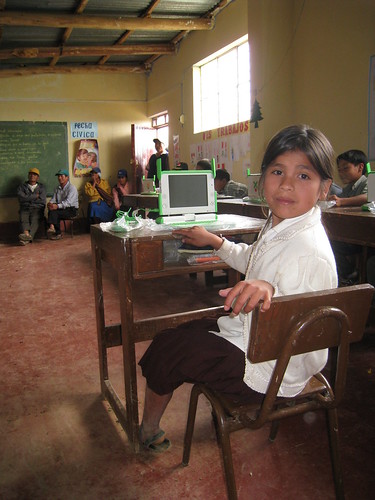
Teach students that education can change the world

Ferreñafe, Peru

The XO laptop developed by the One Laptop Per Child (OLPC) organization is an “education project, not a laptop project.” I think this would also make a great lesson for students in the developed world about how children live and learn in poor, developing countries.

The OLPC wiki has lots of field diaries, videos, and stories that would be very appropriate to share with students and start a conversation about education around the world. This isn’t a “isn’t it sad how poor they are” lesson, it’s a lesson about how much education means to people even when they seem to have so little. Start here.

Go the next step
OLPC does give you the opportunity to simply donate money, and if your students feel strongly about helping, they could plan a fundraiser. Schools could also get some of the XO computers for themselves in the current Give One Get One program, but there are some caveats I pointed out in this blog post, Should your school participate in the XO G1G1 program. If your students are gung-ho, though, do it!

Kick it up a notch
Many young people around the world have contributed directly to the OLPC effort whether they actually have an XO laptop or not. There are suggestions for participating on the OLPC wiki including offering to answer tech support emails, translating, hosting or participating in local events, developing applications, and more.

  • A student club can help develop new activities and participate in the XO community. People around the world are working on these open source activities, collaborating, and sharing. Teach students what it means to be a global citizen. Programming is NOT hard; it is well within the capability of many high school students and some middle school students. Even if you don’t have an XO, there are emulators that allow you to program for them.
  • Join or start a local XO support group. They already exist in New York, San Francisco and Washington DC.
  • Have a code jam. Perhaps a local Linux users group would help out.
  • Do a presentation or pass out flyers at a local community event. OLPC offers ready made templates for you.
  • Ask students what they would like to do to “change the world” for youth seeking an education in developing countries. Students need to understand that education is not a “zero sum” game, meaning that if other countries get better at educating poor children, we all benefit.

I’d love to hear about what youth have done to help support the OLPC effort!

Sylvia